Azure Functions connector namespaces bring Power Platform-style automation to code
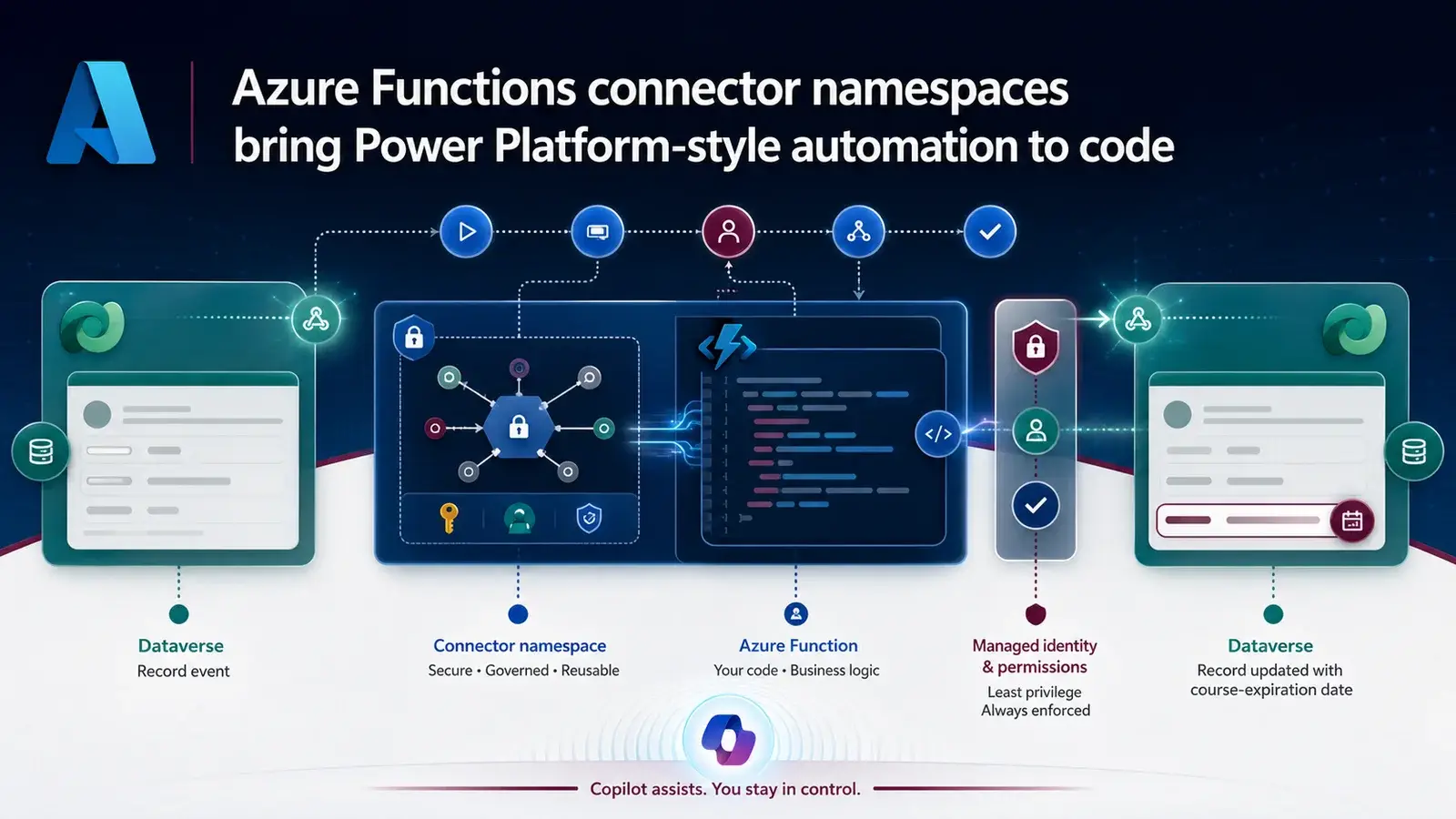
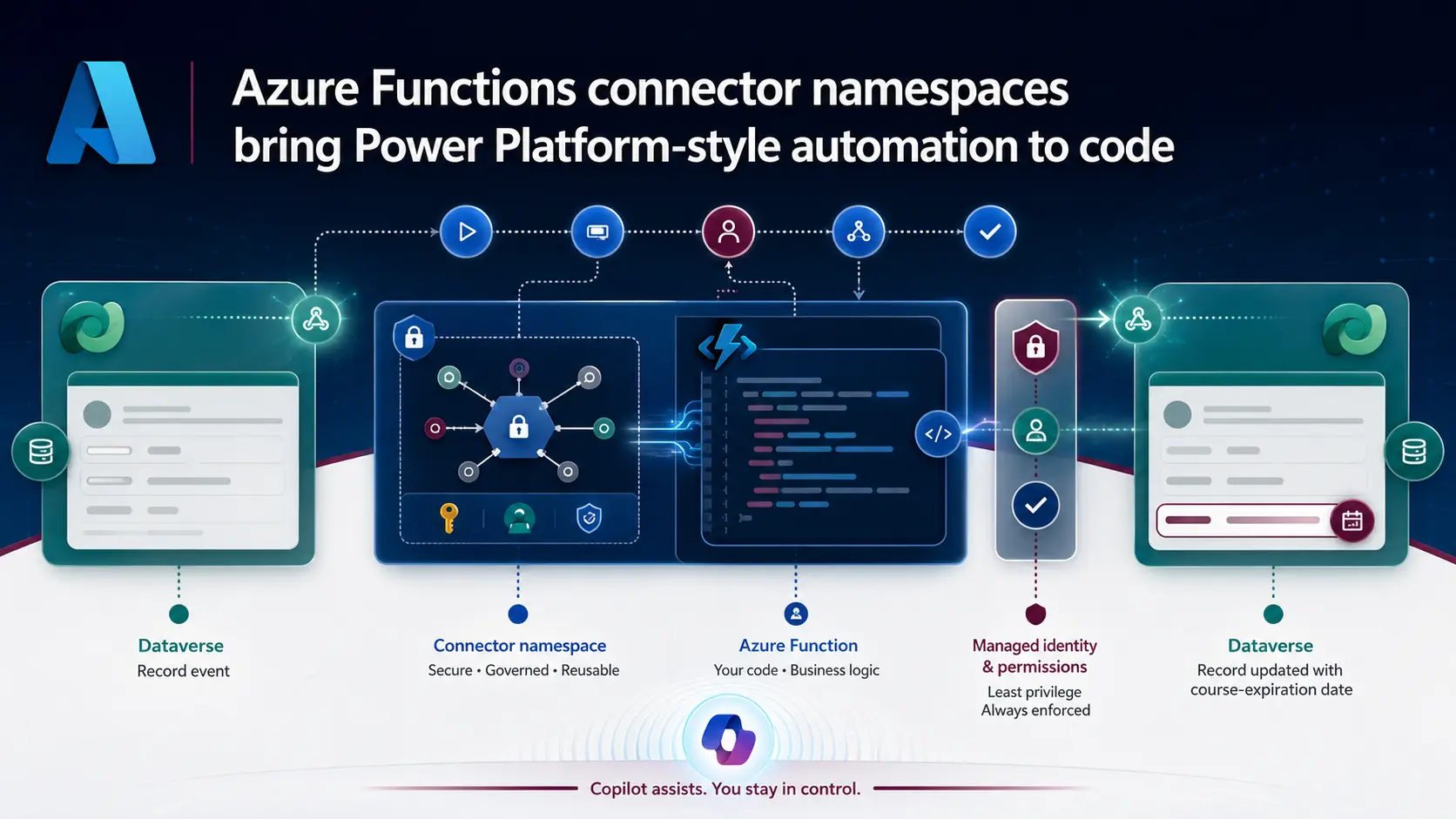
In one of Sean Astrakhan's videos, creating a Dataverse course-contact record triggers an Azure Function that works out when the person's access expires. The Python is simple. The interesting part is the connector namespace, which gives the function a Power Platform-style connection and trigger. It makes the choice between a flow and code a lot less artificial.
The scenario
A course-contact record stores how many days of access someone gets. When the record is created, the function:
- reads the course data and the access period;
- calculates the expiry from the record's creation date;
- writes the result back to Dataverse.
The function is written and deployed with an AI coding assistant, then tested with a real record in a model-driven app. In the Connector Namespace workspace you authenticate a Dataverse connection, inspect runs, see the request payload and follow it into the function — familiar if you know Power Automate, but the logic stays in code.
One honest moment in the video: the assistant's first design used polling instead of the Dataverse trigger. It had to be told.
What the namespace does
Microsoft describes Connector Namespace as a preview integration service that handles connections, authentication, webhook or polling delivery, retries and throttling for supported connectors. A function app can consume connector triggers and call connector actions. Your team owns the business logic; the connector platform handles the plumbing.
Flow or function?
How I decide:
- Power Automate when the work is mainly orchestration and a visual flow is the easiest thing to maintain.
- Azure Functions when you need custom libraries, in-memory processing, complex branching, code reuse, or a pipeline your developers already run.
Neither choice decides whether a calculation belongs in a Function, a Dataverse plug-in or a flow. That is still a design decision.
Building it
- Event. Table, create condition and needed fields — here, the course-contact ID, access duration and creation date.
- Connector boundary. Create the namespace, authenticate Dataverse, and use the connector trigger. Put trigger and action names in the project instructions so the assistant does not invent a polling loop.
- Small function. Parse and validate the payload, skip records that already have an expiry, fetch the source row, calculate, and return clear errors for bad input.
- Identity. The managed identity avoids storing a secret, but Dataverse still needs an application user with a least-privilege role. Not a broad admin role "just to prove it works".
- A real run. Deploy the normal way, create a test record, and check the connector run, payload, function logs and Dataverse result. Then test a duplicate, a missing course and a denied permission.
The video also notes that namespace runs can take longer than a typical flow run. Design for asynchronous behaviour, duplicate delivery and retries that might repeat a write.
I like where this is going. Use AI for the first draft, then make identity, permissions and failure behaviour part of the design review. A connector simplifies authentication and events; it does not make generated code correct.
A good experiment: take one flow that has become hard to maintain because of custom expressions or high volume, and move just one contained operation into a function. Compare readability, run time, error handling, deployment effort and support ownership. Sean's Untethered 365 AI for Architects training has more material along these lines.
Sources
References used for this article. Links open in a new tab.
- YouTube — video
- connectors.azure.com — Connector Namespaces
- GitHub — Azure-Samples/functions-connectors-python pull request #8: Add Microsoft Dataverse (commondataservice) trigger + action sample by manvkaur
- Microsoft Learn — What is Connector Namespace?
- Microsoft Learn — Use managed connectors in Azure Functions
- Microsoft Learn — Manage application users in the Power Platform admin center
- GitHub — Azure-Samples/functions-connectors: Azure functions support for connectors
- Untethered 365 — Free Training
- LinkedIn — Sean Astrakhan (profile)